⚠ Work in Progress (Beta). Some apps & features
are incomplete, buggy, or incorrect. Feedback welcome:
open an issue
(soon).
▶
Quick demo & explanation — video coming soon
How do we hear earthquakes?
Build an array and find out.
The Beamforming Playground is a collection of
interactive browser apps that teach
seismic beamforming. Seismologists use beamforming
to detect earthquakes, explosions and ocean storms and to work out
where they came from. Build your own sensor array, steer it, form
the beam, and watch the physics respond in real time right in your
browser.
Made for students, the curious,
and teachers: no installation, no math required.
Each app comes with guided exercises to help you learn step-by-step.
Difficulty is indicated by the number of ⏺.
This is an interactive learning tool for
seismic beamforming—a technique used by
seismologists to detect earthquakes and understand how seismic
waves propagate through the Earth. Think of it like a virtual
laboratory where you can experiment with arrays of seismic sensors
and see what happens.
No prior knowledge is required! You can start exploring
immediately, and each app guides you through specific concepts
step by step. The whole playground is
free and open source, runs entirely in your
browser, and works offline after your first visit.
Why should I care about beamforming?
Beamforming is fundamental to modern seismology. Here's why it
matters:
Earthquake detection: It helps find small
earthquakes that would otherwise be lost in background noise
Determining earthquake location: It tells us
both where an earthquake happened and how the
ground moved
Understanding Earth's interior: By analyzing
how waves travel through the Earth, we can map its internal
structure
Real-world applications: The same principles
apply to radar, sonar, wireless communications, and even medical
imaging
What is Beamforming, exactly?
Imagine standing in a field with your eyes closed, hearing a bird
chirp. With one ear, you know something is making a
sound. With both ears, you can tell which direction the
sound is coming from—because sound reaches your ears at slightly
different times.
Beamforming does the same thing, but with seismic stations
instead of ears.
By combining signals from multiple stations spread across tens or
hundreds of kilometers, we can:
Enhance weak signals (like distant earthquakes)
Determine the direction waves are coming from
Measure how fast waves are traveling (their velocity)
Separate different types of waves arriving at the same time
The mathematical technique is called "beamforming" because we can
mentally "point" our array in different directions—like steering a
beam of light—to see where the strongest signal comes from.
What's the difference between seismology and other beamforming?
You might be familiar with beamforming from other fields
(acoustics, antenna arrays, ultrasound). Seismic beamforming has
some unique twists:
2D arrays: Most seismic arrays are spread
across Earth's surface (2D), not in a line (1D)
Slowness, not angle: We measure wave speed as
"slowness" (inverse velocity) and steer in both azimuth and
slowness
Plane waves from far away: For distant
earthquakes, we assume flat wavefronts; for nearby sources, we
need curved wavefronts (Matched Field Processing)
This website lets you explore all these concepts interactively,
starting from the basics and progressing to more advanced topics.
How do I use this website?
On your first visit to each app, a short guided
walkthrough appears and shows you the ropes. You can restart it
anytime from the ☰ menu (Restart Walkthrough), or skip
it and explore freely.
The core interactions are the same in every app:
Click the map to place a station,
drag a station to move it, and
press & hold a station to bring up a red
Delete pill
Click the array-response plot to steer the beam
— watch the traces react as you find the maximum
Lock icons pin one parameter (velocity,
wavelength, or frequency) so the others stay physically
consistent (v = f · λ). The yellow slider track
shows the allowed range
Load real arrays — like Gräfenberg (Germany) or
NORSAR (Norway) — from the ☰ menu
Every app also includes guided exercises: open
the 📖 book icon next to the Array header and pick a
topic — it unfolds right in the panel.
No installation needed — everything runs in your browser and
works offline after the first visit. Works with mouse and touch;
best on a desktop, laptop, or tablet.
Which app should I start with?
If you're new to beamforming: start with
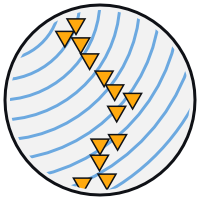
Plane Waves — it teaches the fundamentals: array response
patterns, side lobes, resolution, and how to steer the beam. The
landing page groups the apps into Fundamentals,
Seismic Waves, and Advanced Techniques, roughly
in increasing difficulty.
2 · Broadband Signals: why wider frequency
bands give sharper peaks and fewer side lobes
3 · Noisy Signals: how beamforming improves the
signal-to-noise ratio
4 · Multiple Sources: when can we separate two
simultaneous arrivals?
5 · Wave Types: how sensitive arrays are to P,
S, Love, and Rayleigh waves
7 · 3-Component Beamforming: polarization and
wave-type-specific beamforming with three-component sensors
8 · FK Analysis: how plane waves map into
wavenumber–frequency space
9 · Matched Field Processing: handling curved
wavefronts from nearby sources
11 · DAS Beamforming: fibre-optic cables as
dense virtual arrays
How much math do I need to know?
Short answer: None! These apps are designed to
build intuition first, without equations. You'll learn by
doing—clicking, sliding, observing, and experimenting.
Longer answer: The underlying mathematics
involves Fourier transforms, complex numbers, and wave propagation
physics. But you don't need to understand the math to grasp the
concepts. If you're curious, the code is all here for you
to explore—it's written in plain JavaScript with no external
dependencies.
I'm a teacher/instructor. How can I use this?
These apps work great for:
Live demonstrations in lectures—project the
screen and let students guide you
Labs or problem sets—have students complete the
guided exercises
Self-paced learning—assign specific apps as
homework
Exploration—let curious students discover
concepts on their own
Each app includes guided exercises that work well as structured
activities. The apps complement (rather than replace) textbooks
and lectures by making abstract concepts tangible. And since the
site works offline once loaded, it's reliable even in lecture
halls with poor Wi-Fi.